
Today, customers often search Google before choosing a local business. Whether someone searches for “SEO company near me,” “SEO agency in India,” “restaurant near me,” or “best dentist in my city,” Google Search and Google Maps can strongly influence which businesses customers discover.
Google My Business, now officially known as Google Business Profile (GBP), is Google’s platform for managing how an eligible business appears across Google Search and Maps.
A properly created and optimized Google Business Profile can help customers discover your business, view your services, read reviews, visit your website, call your business, and request directions.
However, simply creating a profile does not guarantee the #1 position. Successful local SEO requires accurate information, relevance, prominence, genuine reviews, website optimization, and consistent ongoing work.
What Is Google Business Profile?
Google Business Profile is a free tool that allows businesses to manage their presence on Google Search and Google Maps.
A profile can include:
- Business name
- Primary business category
- Address or service area
- Phone number
- Website
- Business hours
- Services
- Products
- Photos and videos
- Business description
- Customer reviews
- Business attributes
For local businesses, GBP can become an important part of a broader Local SEO strategy.
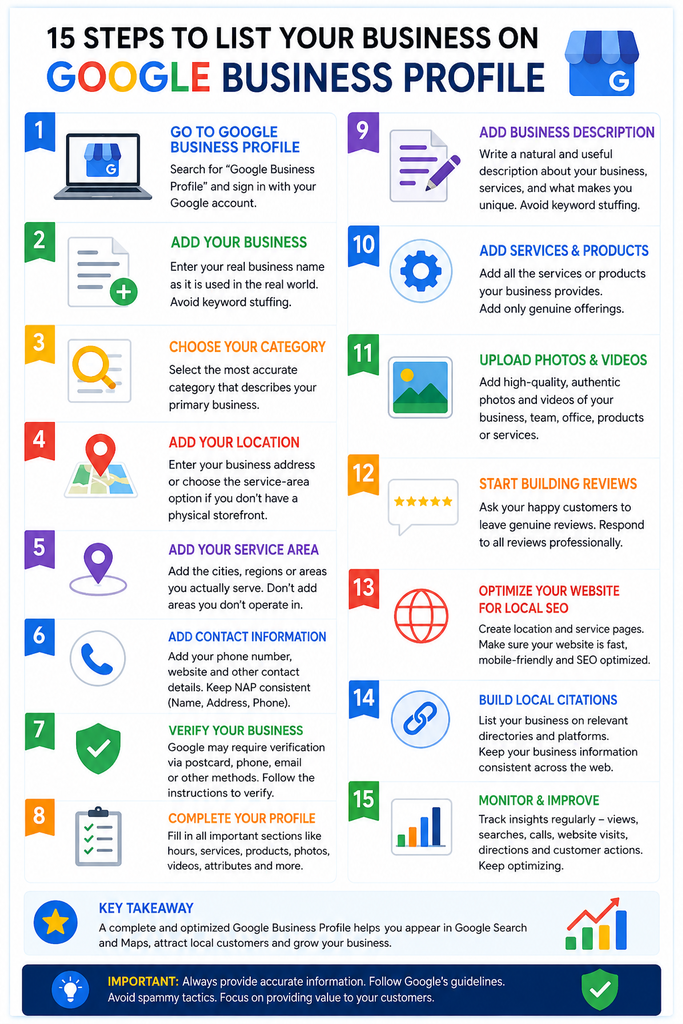
How to List Your Business on Google Business Profile
Creating your listing correctly is the foundation of local search visibility.
Step 1: Open Google Business Profile
Search for Google Business Profile on Google and use Google’s official Business Profile service. Sign in with the Google account you want to use to manage the business.
Step 2: Add Your Business
Choose the option to add or create a business profile.
Enter your real-world business name exactly as it is used by customers.
Avoid adding keywords to your business name simply to manipulate rankings.
For example, use:
RANK
instead of:
RANK – Best SEO Company in Delhi – #1 Digital Marketing Agency
Step 3: Select the Correct Category
Choose the primary category that most accurately represents your business.
You can add additional relevant categories when appropriate, but avoid unrelated categories simply because they contain valuable keywords.
Your category helps Google understand what your business does and which searches may be relevant.
Step 4: Add Your Location
If customers visit your physical location, enter the legitimate business address.
If you operate as a service-area business without receiving customers at your address, select the appropriate service-area option.
Never create fake addresses or locations to target additional cities.
Step 5: Add Service Areas
If you serve customers in specific cities or regions, add the areas your business genuinely serves.
For example, a Delhi-based digital marketing company may serve Delhi, Noida, Gurgaon, Ghaziabad, and Faridabad if it actually provides services in those locations.
Step 6: Add Contact Information
Enter your correct:
- Business phone number
- Website
- Customer contact information
Keep your business information consistent with your official website and legitimate online listings.
Step 7: Verify Your Business
Google may require you to verify the business before you can fully manage the profile.
Follow the verification method provided by Google.
Verification helps establish that you are authorized to represent the business.
Step 8: Complete Your Profile
After verification, complete all relevant sections, including:
- Business description
- Opening hours
- Services
- Products
- Photos
- Videos
- Attributes
- Website
- Contact details
A complete profile provides customers with more useful information and gives Google a clearer understanding of your business.
How to Optimize Google Business Profile for Better Local Rankings
Creating a listing is only the beginning. The next step is optimization.
1. Optimize Your Business Description
Explain what your business does, who you serve, and which products or services you provide.
Write naturally for customers instead of filling the description with keywords.
For example, an SEO agency could describe its expertise in SEO, local SEO, ecommerce SEO, Google Ads, social media marketing, or other services it genuinely provides.
2. Add Your Services
Use the services section to clearly communicate what you offer.
For example:
- SEO Services
- Local SEO
- Ecommerce SEO
- Technical SEO
- Google Business Profile Optimization
- Generative Engine Optimization
- Google Ads
- Social Media Marketing
Only list genuine services.
3. Upload High-Quality Photos
Visual content can make a profile more attractive and informative.
Consider adding:
- Business logo
- Office photographs
- Exterior photographs
- Team photographs
- Products
- Services
- Work environment
- Customer-facing areas
Use authentic images that accurately represent your business.
4. Build Genuine Customer Reviews
Reviews are important for both customer trust and local visibility.
Encourage genuine customers to leave honest feedback and respond professionally to reviews.
Do not purchase fake reviews, create fake customer accounts, or manipulate ratings.
A strong reputation should come from real customer experiences.
5. Keep Business Information Consistent
Your Google Business Profile should match your website and other legitimate business references.
Pay particular attention to:
Business Name + Address + Phone Number + Website
Consistent information helps create a stronger and more trustworthy local presence.
What Determines Google Local Rankings?
Google explains that local results are primarily influenced by three factors:
Relevance
How closely your business profile matches what the customer is searching for.
Distance
How far the business is from the searcher or the location included in the search.
Prominence
How well-known or established the business is.
Prominence can be supported by factors such as reviews and information about the business across the web.
This means there is no legitimate shortcut that guarantees a permanent #1 Google Maps position.
Build Local Citations and Website Authority
Google Business Profile should not operate independently from your website.
A strong local SEO strategy can include:
- Local landing pages
- Technical SEO
- Content marketing
- Relevant local citations
- Digital PR
- Genuine reviews
- Internal linking
- Quality backlinks
- Local business directories
- Consistent business information
Focus on relevant, trustworthy sources rather than submitting your business to hundreds of low-quality directories.
Track Your Google Business Profile Performance
Optimization should be measured continuously.
Monitor metrics such as:
- Profile views
- Search visibility
- Search queries
- Website visits
- Phone calls
- Direction requests
- Reviews
- Customer interactions
- Local keyword rankings
- Google Maps visibility
These insights can help identify which services and locations are generating the most opportunities.
How RANK Can Help With Google Business Profile & Local SEO
At RANK, we treat Google Business Profile optimization as part of a complete local SEO and digital marketing strategy.
Our approach can combine:
Google Business Profile Optimization + Local SEO + Website SEO + Content + Reviews + Citations + Technical SEO + Reputation Management
RANK can help businesses improve their local search presence, optimize their profile, strengthen location-based website pages, develop relevant content, monitor local visibility, and build a stronger digital presence.
The objective is not simply to create a Google listing. The goal is to build a complete local search ecosystem that helps potential customers discover, trust, and contact your business.
Final Thoughts
Google My Business, now called Google Business Profile, remains an important tool for businesses that want to attract customers through Google Search and Maps.
From creating and verifying your listing to selecting the right category, adding services, publishing genuine photos, collecting authentic reviews, optimizing your website, and monitoring performance, every part of the process contributes to a stronger local presence.
However, rankings cannot be guaranteed by simply adding keywords or creating multiple listings.
A sustainable strategy focuses on relevance, distance, prominence, accurate information, customer experience, website quality, and genuine business authority.
If your goal is to increase local visibility and generate more qualified customers from Google, RANK can help you build and manage a comprehensive Google Business Profile and Local SEO strategy designed for long-term digital growth.